AI TOOL / #04050
AI Roundtable
Ask a question and receive answers from multiple AI assistants.
Introduction
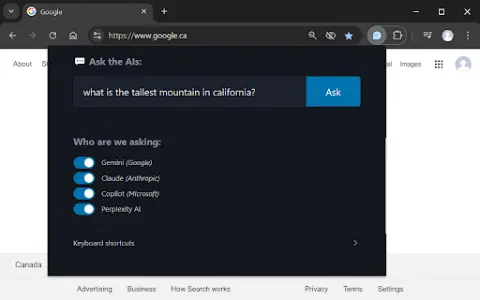
Ask one question, get answers from multiple AI assistants.
What is a Multiple AI Assistants Chrome extension/plug-in?
This website allows users to submit questions at once and receive answers from multiple AI assistants. Users can customize which assistant they want to use for their queries. The website also provides keyboard shortcuts, making it easy to access various functions quickly.
How to use the Multiple AI Assistants Chrome extension?
Use the shortcut keys Ctrl/Cmd + Shift + Q to open the query window and start typing your question. Use Alt + 1 to switch to Gemini, Alt + 2 to switch to Claude, Alt + 3 to switch to Copilot, and Alt + 4 to switch to ChatGPT.
The core functions of various AI Assistant extensions/plugins for Chrome.
Query multiple AI assistants simultaneously
It is possible to customize the selection of AI assistants.
Convenient and fast keyboard shortcuts
It is possible to customize the selection of AI assistants.
Convenient and fast keyboard shortcuts
Related
BenAI Research Assistant
A Chrome extension that helps scientists efficiently browse and analyze scientific literature.
Glarity – Summarize Google and YouTube
ChatGPT extensions designed for summarizing content from YouTube videos, Google pages, and other websites.
Summarize.wtf – AI Copilot
Quickly summarize web pages and documents.
SitePro: Chat with websites like a pro
SitePro: Train custom chatbots on websites to enable efficient information retrieval.
AiAsk Summary
A Chrome extension tool that extracts article outlines to improve reading and research efficiency.
Nuggetize
An AI extension used for summarizing the content of videos, news articles, and web pages.