AI TOOL / #06524
Speak based on Azure Speech
Text-to-speech extension using Azure Speech with support for multiple languages and Chrome live subtitles.
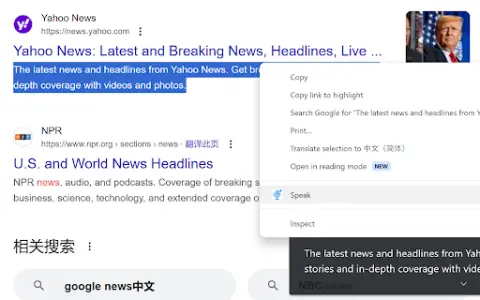
Introduction
Text-to-speech extension using Azure Speech, supports many languages and Chrome Live Caption.
What is Azure Speech TTS Extension ai chrome extension/plugin?
This is a text-to-speech (TTS) extension that leverages the Azure Speech service to convert selected text to audio. It supports multiple languages and integrates with Chrome's Live Subtitles feature for enhanced accessibility. Users need to configure the extension using their Azure Speech Service API key to enable TTS functionality.
How to use Azure Speech TTS Extension ai chrome extension/plugin?
Install the extension, configure it with your Azure Speech Service API key, select text on a web page, and use the extension to play audio for the selected text. Audio playback will be based on the selected language and voice settings.
Core features of Azure Speech TTS Extension ai chrome extension/plugin
Text-to-speech using Azure Speech Service
Support multiple languages
Integrate with Chrome Live Subtitles
Configurable voice settings
Related
Buildpad
Buildpad helps founders transform their ideas into successful products by providing guidance and necessary tools.
Broblems.com
An artificial intelligence-based platform designed to identify user issues and market demands.
Startup Haus
AI-driven platforms that turn startup ideas into impactful careers, leveraging generative AI.
Refinedea
An artificial intelligence-based platform for market research and the validation of business ideas.
Google Ads – Sentiment AI by Flowboost.
Chrome extension for Google Ads sentiment analysis to boost engagement and ROI.
AgentMark
An AI assistant for marketing agencies that automates tasks and delivers data-driven insights.