AI TOOL / #07222
ReadImage
Extract, edit, and copy text from images on web pages.
Introduction
Extracts, edits, and copies text from images on web pages.
What is Image Text Extractor ai chrome extension/plugin?
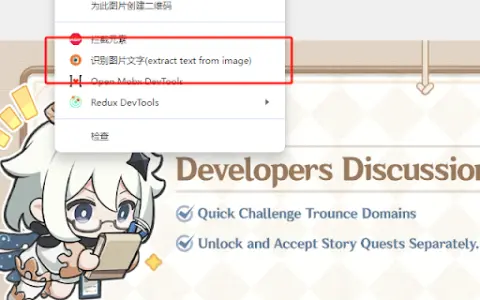
This extension allows users to extract text from images displayed on web pages. It supports common image formats such as jpg, jpeg, png and bmp. After extraction, the text can be edited and copied.
How to use Image Text Extractor ai chrome extension/plugin?
Hover your mouse over the image, right-click and select "Extract text from image". Press "Ctrl + Q" to view the extracted text on the extension page, where it can be edited and copied.
Image Text Extractor ai chrome extension/plugin core features
Extract text from images on web pages
Edit extracted text
Copy extracted text
Related
lisuto.co.jp
LISUTO AI: An intelligent data solution designed to enhance the effectiveness and efficiency of e-commerce sales.
Turn photo into barbie doll
A humorous project that utilizes artificial intelligence to transform photos into images of Barbie or Ken dolls.
Nexmind
An AI-driven marketing platform used for content generation and automated SEO optimization.
Jeeves.Ai
An AI writing assistant with 150+ content creation templates and chat functionality.
AIOAI
The code-free AI platform is designed for marketing and communication purposes, and offers 10 different AI assistants.
Copy Shark
Artificial intelligence-based content generation software that enables the rapid creation of various marketing materials.