AI TOOL / #08846
Copy for Chat GPT
An extension used to copy ChatGPT responses and check for plagiarism.
Introduction
Extension to copy ChatGPT responses and check for plagiarism.
What is the Plagiarism Detector Extension for Chrome – an extension/plug-in for Google Chrome?
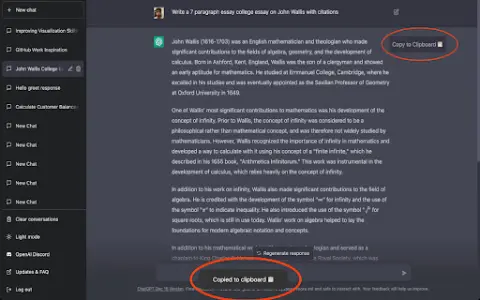
This extension allows you to copy the responses generated by ChatGPT by clicking a button or using the CMD+K shortcut key, and then have those responses checked by plagiarism detection tools.
How to use the Plagiarism Detector Extension for Chrome?
You can use this extension by clicking the copy button on ChatGPT’s response or by pressing CMD+K. The copied text will be automatically checked to determine whether it contains any plagiarized content.
The core functionality of the Plagiarism Detector Extension for Chrome.
One-click to copy the response from ChatGPT
Use the CMD+K shortcut key to copy.
Automatic plagiarism detection
Use the CMD+K shortcut key to copy.
Automatic plagiarism detection
Related
Whisper Wizard
MacOS applications that convert voice into text, when used in conjunction with ChatGPT, can significantly enhance writing efficiency.
webml-speech-recognition
A local Chrome extension that supports speech recognition via files, tags, and the microphone.
Voice Transcription
A Chrome extension designed for recording voice messages and quickly obtaining high-quality instant transcriptions.
Pickupon
AI cloud telephony for internal sales, automating SFA input and improving productivity.
MemFlow
A memory assistant for Mac that allows users to record information and enables semantic searches.
Demoly.io Recorder
A Chrome extension designed for creating interactive operation guides, featuring AI-powered annotation capabilities.