AI TOOL / #09072
Insert, Dont Paste
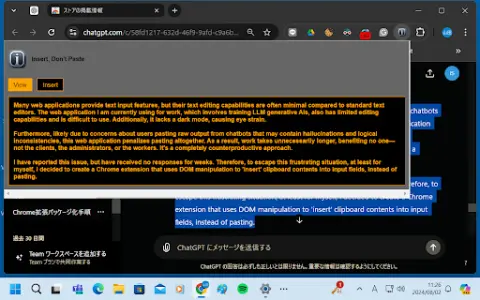
A Chrome extension that allows you to insert text from the clipboard into input fields, thereby bypassing any restrictions on pasting content.
Introduction
Chrome extension to insert clipboard text into input fields, bypassing pasting restrictions.
What is a Chrome extension for text input AI? What kind of Chrome extension or plugin is it?
This Chrome extension is designed to overcome the limitations in text editing capabilities within web applications, especially when it comes to pasting content. It uses DOM manipulation to insert the clipboard contents into input fields, mimicking the behavior of tools like Grammarly in order to avoid any penalties associated with pasting operations. This enables users to enter text efficiently, even when traditional pasting methods are restricted by the web application in question.
How to use the Chrome Extension for Text Input AI Chrome extension/plug-in?
Install the Chrome extension. Once installed, it will automatically detect input fields on web pages. When you copy text to the clipboard, this extension will allow you to “paste” the text directly into those input fields, bypassing any paste restrictions imposed by the website.
Chrome Extension for Text Input: The core functionality of this AI-powered Chrome extension.
DOM operations used for text insertion
Insert the content from the clipboard into the input field.
Bypass the paste restrictions imposed by web applications
Insert the content from the clipboard into the input field.
Bypass the paste restrictions imposed by web applications
Related
Navige
Reducing the cost of AI agents without compromising their performance.
Afterparty
Automatically turn meeting to-dos into emails and message drafts
OpenWhispr
Open-source speech recognition software running locally
Scape
Orchestrating multiple coding agents on a Mac
Lightfield
An AI-based CRM system that automatically tracks all interactions with customers.
Skill Shop
A high-quality and safe Skills store!